Find Similar And Duplicate Photos
Visual Similarity Duplicate Image Finder 5.6.0.1 is Released And Available For Download
Visual Similarity Duplicate Image Finder is a superb tool that outperforms the standard duplicate file finders and can recognize similar photos even if they are stored in different file formats. It can compare a jpg, png and a RAW file for example and identify that they are similar. This is a task that can not be handled by common duplicate file finders that are available on the market.
Download: Duplicate Photo Finder
The key improvements in this release extracted directly from the Duplicate Photo Finder’s What’s new page:
Version 5.6.0.1:
- In Filter dialog added option to filter folders by name using wildcards
- Clicking on the folders grid header icons now checks/unchecks all folders
- Browse for folder dialog is updated so if no folders are checked – the currently selected folder is added
- If delete/move file operation failed, hex error code is shown in the log
- Added checkbox “Zoom To Fit” in the large preview window
Not all improvements are listed above, but these are just a few of the new features and fixes in this release.
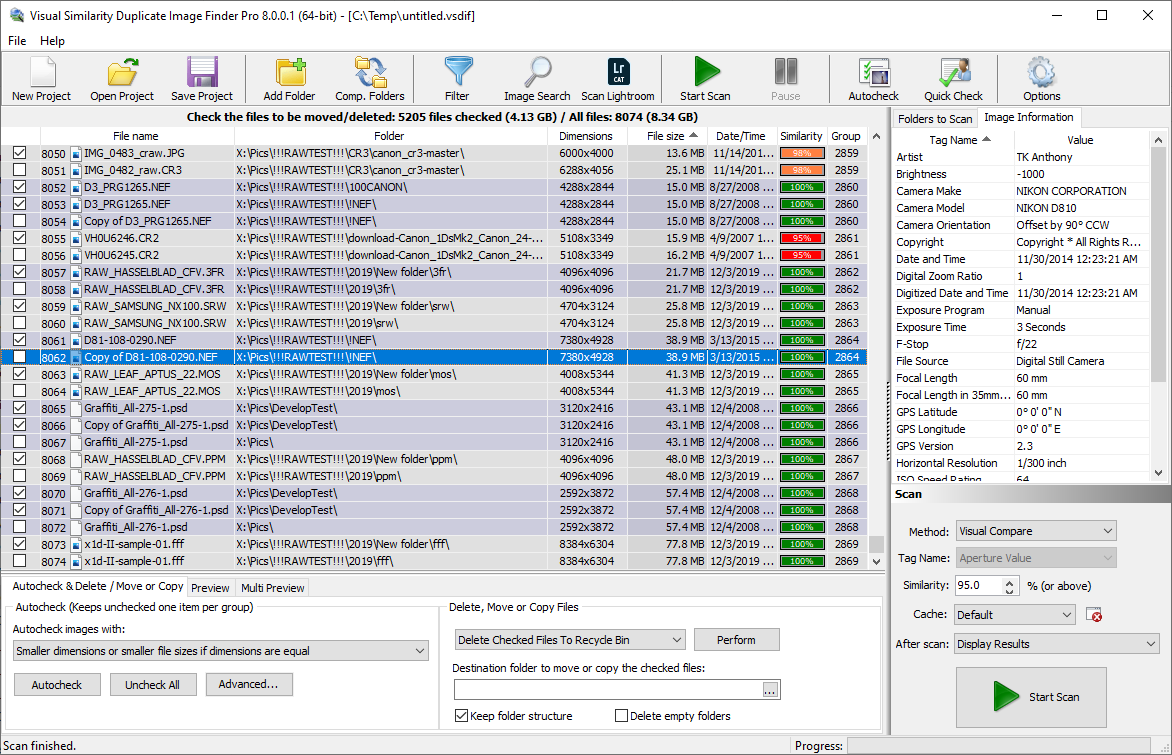
Photo Duplicate Finder
The Key New Features Of The Duplicate Photo Finder Tool
Filtering Duplicate Photos
A handy new option is added in the filtering dialog that makes it possible to filter folders by a phrase including wildcards. For example if the text “copy” is added – all the folders that contain “copy” in the name will be matched. Combinations of phrases can be used by separating them with a vertical line e.g.: “copy|backup|bckp”. In this example along with the folders that contain the phrase “copy” in their name will be listed also the ones that contain “backup” and those that contain “bckp”. A more sophisticated example is “b??(*)*” – it will match all folders starting with “b” followed by two characters then an opening bracket followed by one character and then a closing bracket followed by any number of characters. If the example is not clear enough the asterisk denotes that zero or more characters should be present and the question mark denotes that exactly one character should be present at that position. The combinations are endless and it is easy to match any folder’s name with high precision.
Duplicate Photo Finder User Interface And Features Improvements
Clicking on the folders grid header icons now checks/unchecks all folders for either exclusion from “Auto-check” or from “Self-scan”. The browse for folder dialog is updated so if no folders are marked, the currently selected folder is added. This makes it easier when adding a single folder to the list.
There is a hex error code for every delete/move file operation that fails. This makes it easier to identify the problem e.g. if the files is in use, if the user account used to start the application does not have sufficient permissions to manipulate the file, it he file is stored on a read only media and so on. All the error codes can be found at the Duplicate Photo Finder FAQ page
A new “Zoom To Fit” check-box in the large preview window makes it easier to view the entire photo by automatically resizing it to fit the preview windows.
There is a small fix in the Corporate version where the firs file in the “-des_list” is not compared in certain cases. This applies to the command line feature and the issue has been present only while comparing “-src_list” vs “-dest_list”.
Download: Duplicate Photo Finder
Do you have suggestions? Do you miss a feature? Let us know in the comments below. We will be glad to hear from you!
This article also relates to: Awesome Duplicate Photo Finder, Best Duplicate Photo Finder, Best Duplicate Photo Finder 2014, best duplicate photo finder 2015, Best Duplicate Picture Finder, Duplicate File Finder, duplicate image detector, Duplicate Image Finder Freeware, duplicate image finder freeware windows 7, Duplicate Image Finder Lifehacker, Duplicate Image Finder Open Source, Duplicate Image Finder Review, Duplicate Photo Finder, Duplicate photo finder download, Duplicate Photo Finder iPad, Duplicate Photo Finder Lifehacker, Duplicate Photo Finder Mac, Duplicate Photo Finder Picasa, Duplicate Photo Finder Review, duplicate picture finder 2013, duplicate picture finder 2014, Duplicate Picture Finder Freeware, duplicate picture finder mac, duplicate picture finder open source, duplicate picture finder picasa, Duplicate Picture Finder Windows 7, Find similar looking duplicate photos, Find similar photos download, Find similar photos in iPhoto, Find similar photos mac, Find similar photos upload, Find similar photos using picasa, Freeware Duplicate Photo Finder Download, Reverse Image Search, Visual Similarity Duplicate Image Finder,